

Calibrations
Calibration aggregates
Sliding-window and global aggregates, their settings, output frequency and boundary behaviour.
Orion Data supports two types of aggregates in calibrations: sliding window aggregates and the global aggregate. Both produce a summarised value from a set of data points, but they serve different purposes and produce output in different ways. This article describes both types, their configuration options, and when to use each.
Sliding window aggregate
Section titled “Sliding window aggregate”A sliding window aggregate is configured as an action step within a calibration group. It performs a rolling calculation over a time window ending at the current data point’s timestamp, inclusive.
The aggregate recalculates for every incoming data point, producing one output value per incoming data point. Because the current data point is always included in the window, there is always at least one data point present in the calculation.
Configuration
Section titled “Configuration”| Field | Options |
|---|---|
| Source | Sensor Value or Soft Sensor Value, with This Device or All Devices scope |
| Operation | Min, Max, Sum, Average, Pick |
| Period | 5min, 10min, 15min, 30min, 1h, 2h, 3h, 6h, 8h, 12h, 1d, 2d, 3d, 1w, 2w, 1month, 2months, 3months |
 Example
Section titled “Example”A data point arrives at 09:00. A sliding window aggregate with a 1h period aggregates all data from 08:00 to 09:00 inclusive with the resulting data point timestamp being 09:00.
Self-referencing restriction
Section titled “Self-referencing restriction”A sliding window aggregate can reference the same sensor or soft sensor being calibrated, but only from Group 2 onwards. A self-referencing sliding window aggregate in Group 1 will not produce a valid result because the sensor’s value is only saved after a group completes. Referencing a different sensor has no group restriction.
Pick operation
Section titled “Pick operation”The Pick operation selects the first data point at the start of the window. The same result can be achieved more simply by applying a time offset to a Sensor Value or Soft Sensor Value action step.
Global aggregate
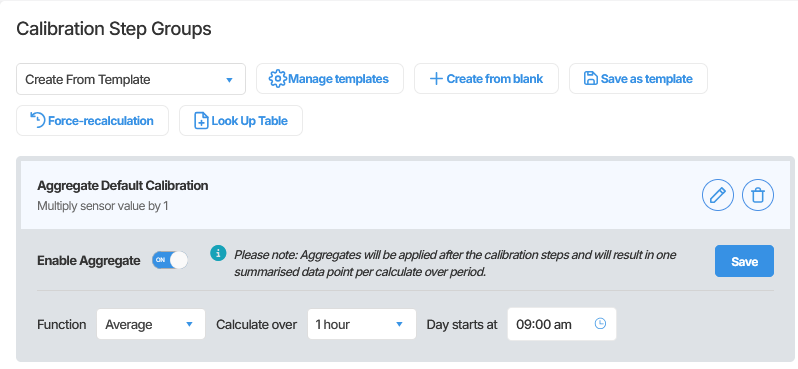
Section titled “Global aggregate”The global aggregate is configured at the calibration level, outside of any group. It is applied after all calibration groups have executed and produces one summarised data point per period rather than one per incoming data point.
The value that the global aggregate summarises is the final calibrated output after all groups have run. It does not depend on any specific group.
At least one calibration group must exist before the global aggregate can be enabled. If no groups exist, Orion Data will prompt you to create a default pass-through group to satisfy this requirement.
Configuration
Section titled “Configuration”| Field | Options |
|---|---|
| Function | Min, Max, Sum, Average, Pick |
| Calculate Over | 5min, 10min, 15min, 30min, 1h, 2h, 3h, 6h, 8h, 12h, 1d, 2d, 3d, 1w, 2w, 1month, 2months, 3months |
| Day Starts At | A time value that sets the epoch for period boundaries |
 Day Starts At
Section titled “Day Starts At”The Day Starts At setting determines both when each period begins and the timestamp applied to each output data point. For example, with Day Starts At set to 9:00 AM:
- A 1d period runs from 09:00 to 09:00 the following day, and the output data point is timestamped 09:00 AM.
- A 1h period produces output data points at 09:00, 10:00, 11:00, and so on.
If a period contains no data points, for example because the device was offline, no output data point is produced for that period.
Pick operation
Section titled “Pick operation”The Pick operation selects the first data point in the period.
Choosing between the two aggregate types
Section titled “Choosing between the two aggregate types”| Consideration | Sliding Window | Global Aggregate |
|---|---|---|
| Output frequency | One value per incoming data point | One value per period |
| Recalculates on each new reading | Yes | No |
| Configured as | An action step within a group | A calibration-level setting outside the groups |
| Use when | You need an aggregated value updated at every data point | You need exactly one summarised data point per period |
When neither aggregate is appropriate
Section titled “When neither aggregate is appropriate”If you need accumulating data that resets at a fixed time each period, for example a daily running total, neither aggregate type is the correct tool. This pattern requires a specific multi-group approach on a soft sensor. See Common calibration patterns for details.
Using both aggregate types together
Section titled “Using both aggregate types together”A sensor can have both a sliding window aggregate configured as an action step and a global aggregate enabled simultaneously. The global aggregate will summarise the output of the calibration groups, which may itself include sliding window aggregate steps.
Summary
Section titled “Summary”Sliding window aggregates and the global aggregate both summarise data over a period, but they differ in when and how they produce output. Sliding window aggregates recalculate on every incoming data point and are configured as action steps within a group. The global aggregate produces one data point per period and is configured at the calibration level after all groups. For accumulating patterns with periodic resets, neither aggregate is appropriate and a multi-group soft sensor pattern should be used instead.
Next Steps
Section titled “Next Steps”- Learn how to configure action steps that use sliding window aggregates: see Action step types reference
- Understand how the global aggregate interacts with calibration groups: see Working with calibration groups
- Explore the daily running total pattern: see Common calibration patterns
Related articles
Section titled “Related articles”- Calibration action step types
- Calibration operators
- Working with calibration groups
- Common calibration patterns