

Devices and channels
Device Health
Telemetry fields, transmission metrics and temperature panels for supported firmware.
It is available to all users and is useful for identifying transmission issues, assessing signal quality, and monitoring the operating temperature of the device hardware.
Note: This feature is only available for EWS devices with Firmware V4.133 or newer.
Navigating to Device Health
Section titled “Navigating to Device Health”- Navigate to Devices and select the device you want to review.
- Select the Device Health tab.
Selecting a date range
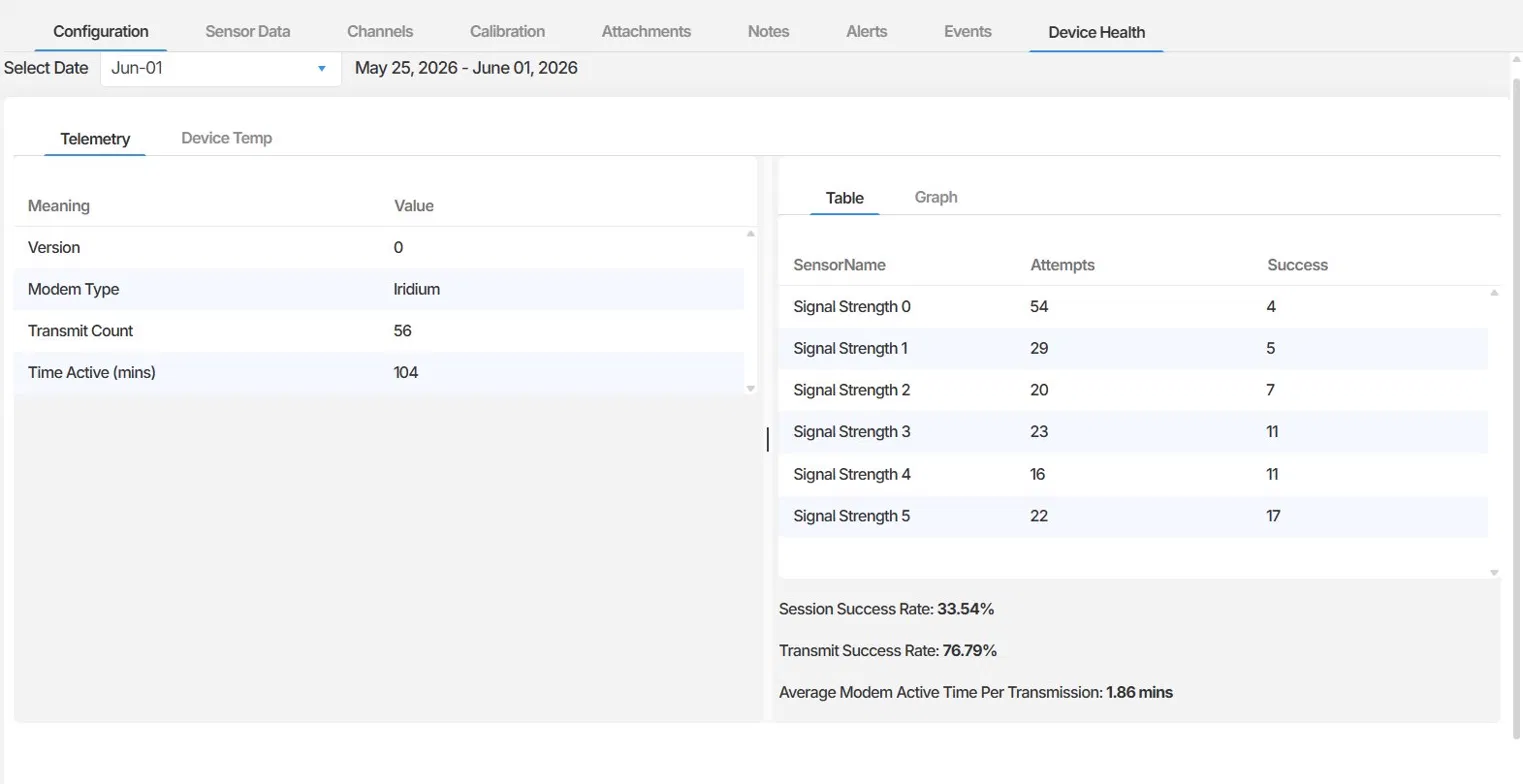
Section titled “Selecting a date range”Use the Select Date filter at the top of the tab to choose the week you want to review. The panel displays data for the 7-day period ending on the selected date.
Telemetry
Section titled “Telemetry”The Telemetry sub-tab shows communication and modem activity for the selected period. It is divided into two panels.
Device information
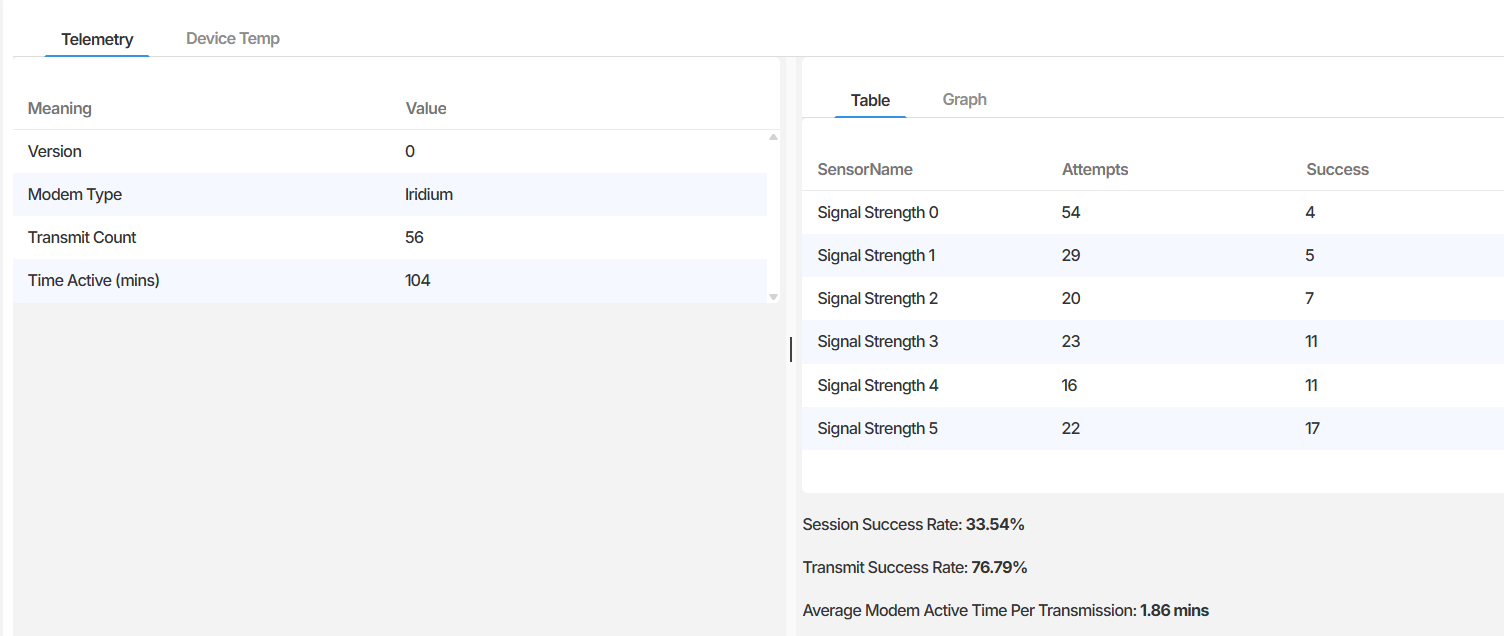
Section titled “Device information”The left panel displays general modem information for the device:
| Field | Description |
|---|---|
| Version | The firmware version reported by the device modem. |
| Modem Type | The transmission technology used by the device (for example, Iridium). |
| Transmit Count | The total number of transmission attempts made during the selected period. |
| Time Active (mins) | The total time the modem was active during the selected period, in minutes. |
Signal strength and transmission performance
Section titled “Signal strength and transmission performance”The right panel shows a breakdown of transmission attempts and successes by signal strength level for the selected period.
Signal strength is rated on a scale of 0 to 5, where 0 represents the weakest signal and 5 represents the strongest. For each signal strength level, the table shows:
- Attempts - the number of transmission attempts made at that signal strength
- Success - the number of those attempts that resulted in a successful transmission
Below the table, three summary metrics are displayed:
Session Success Rate The percentage of modem sessions that successfully established a connection. A low session success rate may indicate difficulty connecting to the network, which can be caused by poor signal conditions or hardware issues.
Transmit Success Rate The percentage of transmission attempts in which data was successfully delivered to the platform. This metric reflects overall data reliability for the period.
Average Modem Active Time Per Transmission The average time in minutes the modem remained active for each transmission attempt. Consistently high values may indicate the modem is struggling to complete transmissions efficiently.
Device Temp
Section titled “Device Temp”The Device Temp sub-tab shows the internal operating temperature of the device hardware over the selected period. This reflects the temperature inside the device enclosure, not any external sensor reading.
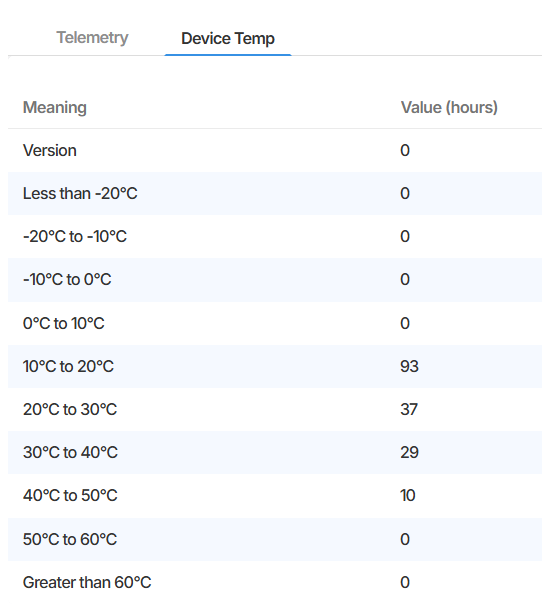
The left panel lists predefined temperature bands from less than -20 degrees Celsius to greater than 60 degrees Celsius, with the number of hours the device spent operating within each range during the selected period.
The right panel displays the same data as a bar chart, making it easy to see at a glance which temperature ranges the device experienced most frequently.
This information is useful for identifying whether a device is being exposed to temperatures outside its expected operating range, which may affect hardware reliability over time.
Summary
Section titled “Summary”The Device Health tab provides a weekly view of a device’s communication performance and internal temperature. The Telemetry sub-tab shows modem activity, signal strength distribution, and transmission success rates. The Device Temp sub-tab shows how long the device operated within each temperature range, which can be used to assess environmental stress on the hardware.
Next Steps
Section titled “Next Steps”- If transmission success rates are consistently low, contact EWS Monitoring support for assistance
- Review the Sensor Data tab to confirm whether data gaps correspond to periods of low transmission success
- Check the Device Temp data if a device is installed in an environment with extreme temperatures