

Calibrations
Calibration conditions
Value, time and date conditions, supported comparisons and calibration-group evaluation rules.
Conditions control whether a calibration group’s action steps run for a given incoming data point. Each group can have zero or more conditions. When multiple conditions are present, all of them must be true for the group to execute. Conditions are AND-chained. There is no built-in OR logic within a single group; OR logic is achieved by creating multiple groups with different conditions and identical actions.
If a group has no conditions, its action steps always run.
Condition types
Section titled “Condition types”Three condition types are available. All three support the same set of operators.
| Condition Type | Evaluated Against |
|---|---|
| Value | The incoming data value (see evaluation behaviour below) |
| Time | The time component of the data point’s timestamp |
| Date | The full date and time of the data point’s timestamp |
Operators
Section titled “Operators”All condition types support the following operators:
| Operator | Behaviour |
|---|---|
| Between | True if the value falls within the specified range (inclusive) |
| Greater Than | True if the value exceeds the specified threshold |
| Less Than | True if the value is below the specified threshold |
| Equal To | True if the value exactly matches the specified value |
Value condition evaluation behaviour
Section titled “Value condition evaluation behaviour”The Value condition does not always evaluate the same input. Its behaviour depends on the group’s position in the calibration.
First group
The Value condition evaluates the raw incoming value. For a raw sensor, this is the sensor’s raw reading. For a soft sensor, this is the raw value of the base sensor the soft sensor draws from.
Subsequent groups
The Value condition evaluates the output of the previous group, not the original raw incoming value.
This distinction is important when designing multi-group calibrations. If a later group needs to branch based on the original raw reading, that logic must be accounted for in the group design, as conditions in later groups will see the transformed value, not the source reading.
Input formats by condition type
Section titled “Input formats by condition type”Enter any number. Decimal values are supported.
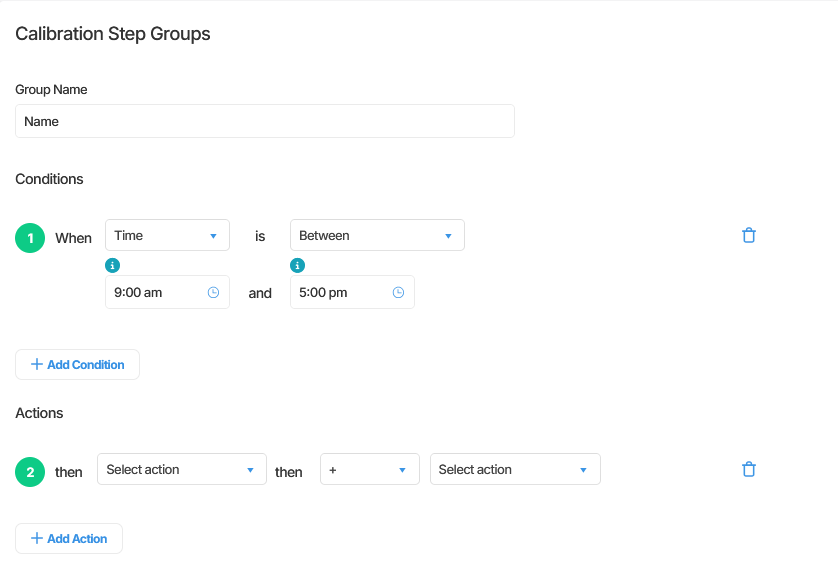
Enter times in 12-hour format: h:mm a (for example, 9:00 AM, 5:30 PM).
Enter the full date and time in the following format: dd/MM/yyyy hh:mm:ss aa (for example, 01/01/2024 09:00:00 AM).
Conditions and action steps
Section titled “Conditions and action steps”Conditions are configured separately from action steps within the group interface. They appear above the action steps section. A group must always contain at least one action step. Conditions alone are not sufficient to form a valid group.
What happens when conditions are not met
Section titled “What happens when conditions are not met”The behaviour when a group’s conditions are not met depends on the group’s position.
| Group Position | Behaviour When Conditions Not Met |
|---|---|
| First group | The raw data value is used unchanged |
| Any subsequent group | The output value from the previous group carries through unchanged |
| When designing a calibration where the first group has conditions, ensure that subsequent groups account for the possibility of a null value being passed through. |
Summary
Section titled “Summary”Conditions determine whether a calibration group’s action steps execute for a given data point. They are AND-chained within a group, support Value, Time, and Date types, and share a common set of four operators. The Value condition evaluates differently depending on whether it is in the first or a subsequent group. When conditions are not met, the first group produces null while subsequent groups carry the previous group’s output forward unchanged.
Next Steps
Section titled “Next Steps”- Review how action steps are configured within a group: see Action step types reference
- Learn how to implement OR logic using multiple groups: see Common calibration patterns
- Understand how groups execute in sequence: see Working with calibration groups
Related articles
Section titled “Related articles”- Calibration action step types
- Calibration operators
- Working with calibration groups
- Common calibration patterns