

Calibrations
Calibrations and sensor values
Raw and soft-sensor values, transformation groups, conditions, actions and reusable templates.
Calibrations are a data transformation layer applied to sensor readings before they are displayed in Orion Data or used in alarms. Rather than displaying raw values directly from a device, a calibration allows you to reshape, convert, filter, or aggregate that data into a more meaningful form.
This article provides a conceptual overview of calibrations, the key components involved, and how they fit into the platform. For step-by-step instructions on creating a calibration, see Setting up your first calibration.
What calibrations do
Section titled “What calibrations do”When a device sends a reading to Orion Data, that reading passes through the calibration before it is stored as the sensor’s displayed value. The calibration can perform operations such as:
- Converting a raw reading from one unit to another, for example Fahrenheit to Celsius
- Applying a scaling factor or offset to correct for sensor drift
- Mapping raw values to meaningful outputs using a lookup table
- Aggregating readings over a time window to produce a rolling average or total
- Applying different transformations depending on the time of day, date, or value of the reading
Calibrations only affect new incoming data by default. Existing historical data is not recalculated unless Force-Recalculation is explicitly triggered.
Raw sensors and soft sensors
Section titled “Raw sensors and soft sensors”Calibrations can be applied to raw sensors or soft sensors. Understanding the difference between the two is important before configuring a calibration.
Raw sensors
Section titled “Raw sensors”A raw sensor is a physical data channel on a device. It holds the unprocessed reading as received from the hardware. Applying a calibration directly to a raw sensor overwrites the displayed value with the calibrated result, making the original raw reading unavailable for independent visualisation.
Soft sensors
Section titled “Soft sensors”A soft sensor is a virtual sensor created on a device record with no corresponding physical sensor. It can draw from raw sensors or other soft sensors and has its own calibration applied to it. Because the soft sensor holds the transformed value separately, the original raw sensor reading remains accessible alongside it.
Applying calibrations to soft sensors is the recommended approach in Orion Data. This preserves the integrity of the raw data while making the transformed value available for dashboards, alarms, and other uses.

Key components of a calibration
Section titled “Key components of a calibration”A calibration consists of the following components. Each is described briefly here; dedicated reference articles cover the configuration details of each.
Calibration groups
Section titled “Calibration groups”A calibration contains one or more groups. Each group has an optional set of conditions and a required set of action steps. Groups execute from top to bottom on every incoming data point. There is no early exit; all groups always run.
Conditions
Section titled “Conditions”Conditions determine whether a group’s action steps execute for a given data point. When multiple conditions are present within a group, all must be true for the action steps to run. If a group has no conditions, its action steps always run.
Action steps
Section titled “Action steps”Action steps define the mathematical expression applied to produce the group’s output value. Each step is a two-sided expression using a left side, an operator, and a right side. The output of the final step in a group becomes that group’s output, which is passed to the next group.
Calibration templates
Section titled “Calibration templates”A saved set of calibration groups that can be applied to multiple devices. Templates allow consistent calibration logic to be reused across devices without manual reconfiguration each time.
How calibrations fit into the platform
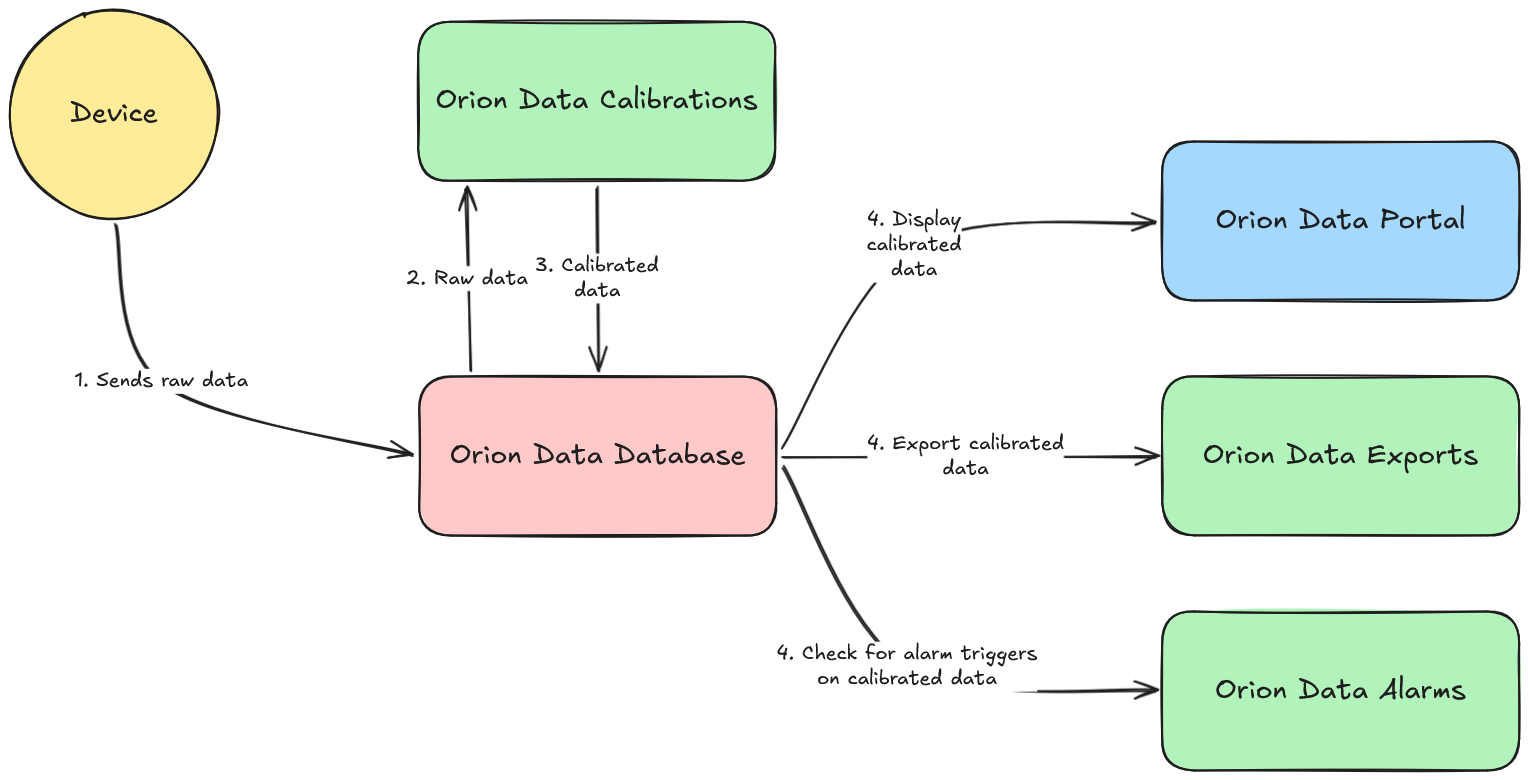
Section titled “How calibrations fit into the platform”Calibrations sit between the raw device reading and everything else in Orion Data. Dashboards, alarms, and data exports all use the calibrated value rather than the raw reading. This means a well-configured calibration ensures that every part of the platform reflects accurate, meaningful data.
Summary
Section titled “Summary”Calibrations are a transformation layer that processes raw sensor readings before they are displayed or used elsewhere in Orion Data. They consist of one or more calibration groups, each with optional conditions and required action steps, plus an optional global aggregate. Applying calibrations to soft sensors rather than raw sensors is recommended, as it preserves the original reading for independent use. Dashboards, alarms, and exports all consume the calibrated value.
Next Steps
Section titled “Next Steps”- Create your first calibration: see Setting up your first calibration
- Understand how calibration groups and conditions work: see Working with calibration groups
- Learn about the available action step types: see Action step types reference
Related articles
Section titled “Related articles”- Create your first calibration
- Working with calibration groups
- Calibration action step types
- Calibration aggregates
- Lookup tables reference