

Alarms
Alarm conditions and notifications
Sensor alarm conditions, consecutive readings, resets, notifications and management permissions.
When a sensor reading meets a defined condition, Orion Data sends a notification to the relevant recipients by SMS, email, or both. This article explains how alarms work, what conditions can be configured, and who can manage them.
Where to find alarm settings
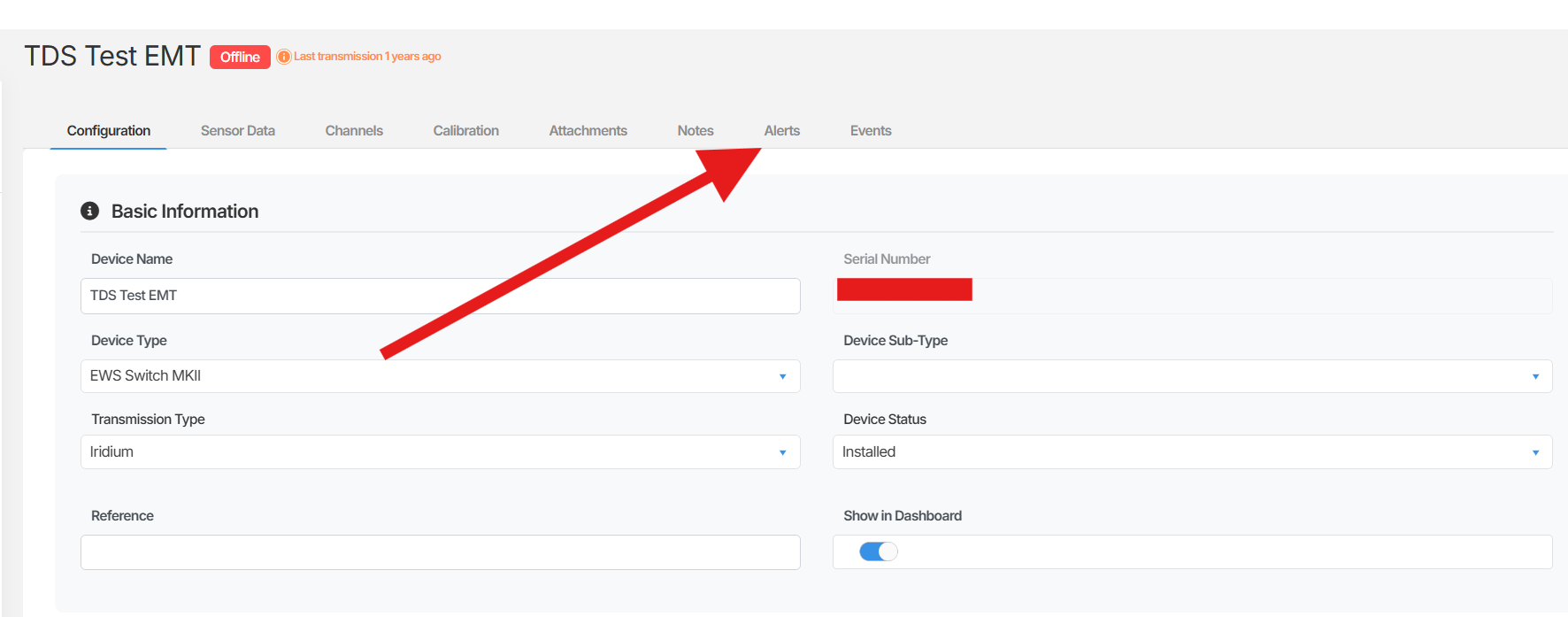
Section titled “Where to find alarm settings”Alarms are configured at the device level. To access the alarm settings for a device:
- Navigate to the device configuration page for the relevant device.
- Select the Alert tab.
From here you can view existing alarm conditions configured on the device and, if you have the appropriate permissions, create or modify them.
Alarm conditions
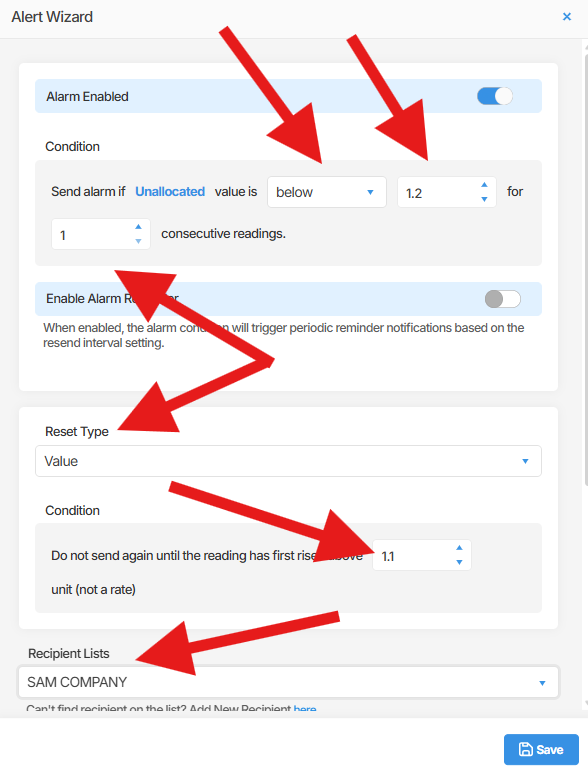
Section titled “Alarm conditions”Each alarm is configured on a specific sensor channel within a device. You define a condition that, when met, triggers a notification to be sent.
Condition types
Section titled “Condition types”Orion Data supports the following condition types:
- Threshold-based: Trigger an alarm when a sensor reading goes above or below a defined value. For example, trigger an alarm when water level rises above 4.5 metres.
- Range-based: Trigger an alarm when a sensor reading falls within or outside a defined value range. For example, trigger an alarm when a reading is between 0 and 5.
- Count-based: Trigger an alarm only after the condition is met a specified number of consecutive times. The minimum is 1. For example, trigger after the threshold is breached 3 consecutive readings in a row. This helps reduce false positives caused by momentary spikes.
Reset conditions
Section titled “Reset conditions”You can also define when an alarm should return to a normal state after it has been triggered. Reset options include:
- Time-based reset: The alarm resets automatically after a defined period following the initial trigger (for example, after 1 hour).
- Value-based reset: The alarm resets when the sensor reading returns to a defined value or range.
Alarm notifications
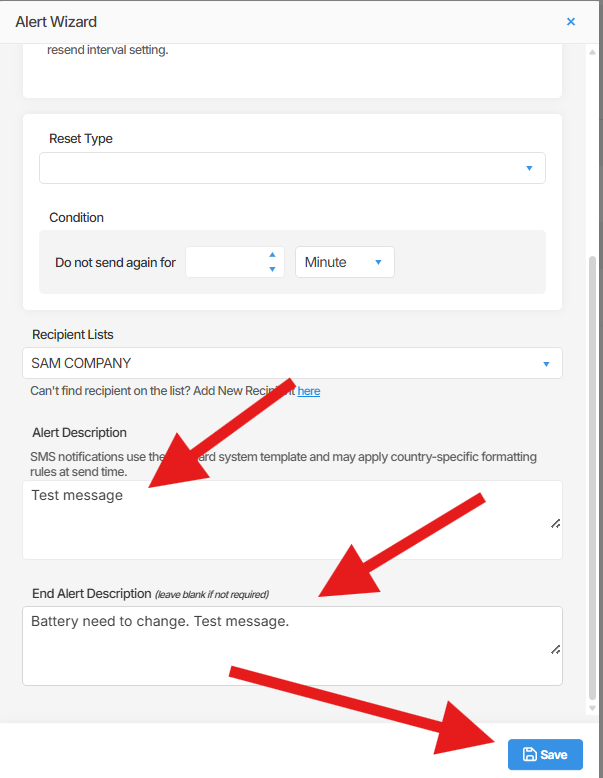
Section titled “Alarm notifications”When an alarm condition is met, Orion Data sends a notification to the configured recipients. Notifications can be sent by:
- SMS
- Both SMS and email
Each alarm has a customisable subject and message body, allowing you to tailor the notification content to the specific condition being monitored. For example, you can configure separate alarms on the same device for water level and battery level, each with a distinct subject and message.
Alarm recipients
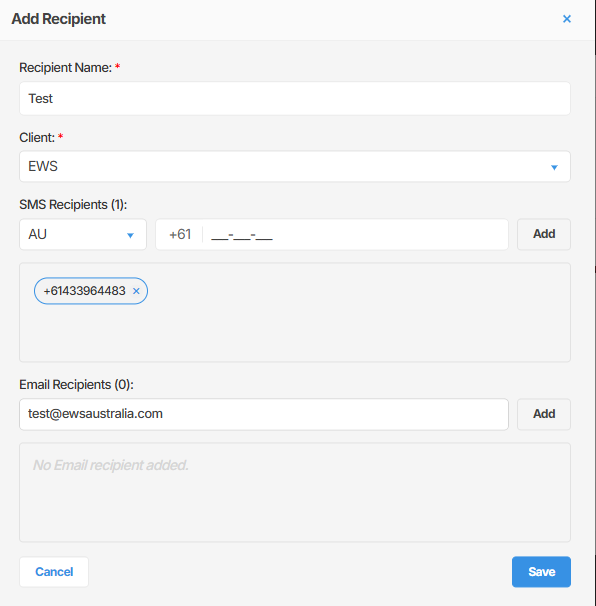
Section titled “Alarm recipients”Notifications are sent to a defined list of recipients. Recipients can be configured to receive SMS, email, or both.
Permissions
Section titled “Permissions”Access to alarm configuration is role-based:
- Tenant Admin and EWS Australia: Can create, edit, and delete alarm conditions.
- Standard users: Can view configured alarm conditions but cannot make changes.
Summary
Section titled “Summary”Alarms in Orion Data allow you to monitor sensor channels and receive automated notifications when defined conditions are met. Conditions can be threshold-based, range-based, or count-based, and each alarm supports a reset condition to return to a normal state. Notifications are sent by SMS, email, or both, with fully customisable subject and message content. Alarm configuration is managed from the Alert tab within the device configuration page and is restricted to Tenant Admin and EWS Australia roles.
Next Steps
Section titled “Next Steps”- Configure your first alarm on a device sensor channel
- Add recipients to receive SMS and email notifications
- Review the alarm history for triggered events in the Alarm Centre
- Set up separate alarms on the same device for different sensor channels
Related articles
Section titled “Related articles”- Getting started with devices in Orion Data
- Understanding the Alarm Centre
- Managing alarm recipients
- Navigating the device configuration page in Orion Data